Game Board Logo Mockup: Bring Your Brand to Play
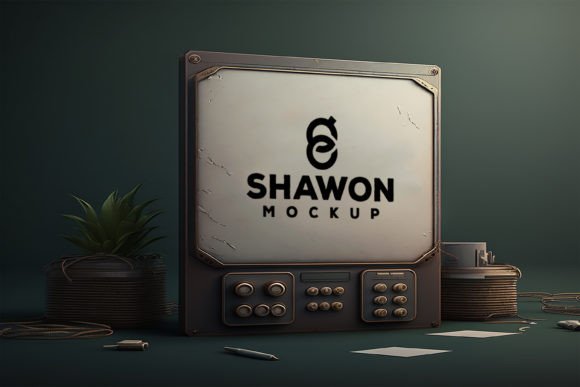
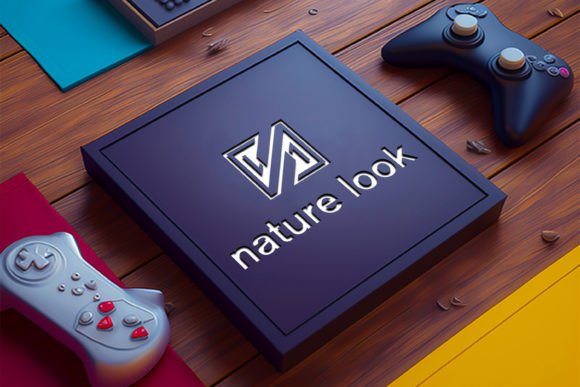
Picture your logo not as a flat graphic on a screen, but as a tactile, real-world element placed right on a beautifully crafted game board. That is exactly what a Game Board Logo Mockup does. It takes your brand mark, your game title, or your creative emblem and embeds it into a highly realistic, three-dimensional setting. Whether you are an indie board game designer, a small business owner hosting game nights, or a graphic artist building a portfolio, this tool gives you a way to show off your work with depth, texture, and genuine context.
At its core, this digital resource is a fully editable, high-resolution Photoshop file that allows you to drop in your own design through smart objects. No complex photo shoots, no expensive product prototypes. You open the file, paste your artwork, and the mockup instantly adapts to the lighting, shadows, and perspective of a carefully photographed game board scene. The result is a presentation that feels alive and professional, perfect for client pitches, online stores, crowdfunding campaigns, or social media announcements.
Why a Game Board Mockup Changes Everything
Traditional logo presentations often live on white backgrounds, business cards, or simple stationery. While those have their place, they rarely capture the imagination of an audience that craves entertainment and connection. A game board introduces storytelling. It hints at strategy, competition, and social fun. When you place your logo on a board game setting, you’re not just showing a symbol — you’re inviting people into an experience.
This is especially powerful if your brand relates to gaming, education, family entertainment, or even corporate team building. A gaming board mockup can make a logo for a digital app feel tangible. It can help a coffee shop’s board game night logo feel authentic. It can turn a simple wordmark into a collectable piece of art. The psychological shift from “logo” to “lifestyle object” is huge, and this mockup helps you tap into that.
What Makes This Mockup Stand Out
The Game Board Logo Mockup isn’t just a single blurry image. It’s a set of carefully prepared scenes designed to give you flexibility. The package includes a main PSD file with a massive 4000x4000 pixel canvas at 300 DPI, which means every detail stays crisp whether you use it on a website header, a giant poster, or a product packaging proof. The resolution is print-ready right out of the folder, so you never have to worry about pixelation.
What really saves you time is the smart object layers. Instead of manually warping, masking, and blending your logo into the board, you simply double-click a designated layer, replace the placeholder with your own artwork, save, and close. The mockup instantly updates with all the realistic shadows, highlights, and textures intact. Because the file is fully layered, you can also tweak the background, adjust the intensity of shadows, or change the board’s color scheme without affecting your placed logo.
The download also bundles a high-quality JPEG preview so you can quickly see what you’re working with, and a help file that walks beginners through every step. You don’t need to be a Photoshop expert. The process is clean, approachable, and built to get you from file to finished visual in minutes.
Fresh Ways to Use Your Game Board Logo Mockup
The obvious use case is presenting a logo for a new tabletop game or a gaming channel. But the versatility of this resource goes well beyond that. Here are a few realistic scenarios where a board game mockup can add unexpected value:
- Crowdfunding previews: Show potential backers how your game’s logo will look on the actual board and box, building trust and excitement.
- Social media content: Create a series of posts where you “reveal” your logo inside a game storage box or on a black board mockup for a sleek, mysterious look.
- Branding for game cafes or events: Design a sign logo mockup that looks like a storefront board, then use the game board version for flyers and menus.
- Educational materials: Teachers and content creators can design playful logos for learning modules, then mock them up as if they belong to a real educational board game.
- Portfolio pieces: Freelancers and design studios can present client work inside a thematic context that shows an understanding of physical product branding.
Because the package offers multiple angles — a flat game board, a storage board with compartments, a side view with a box, and even a vertical sign — you can build a complete brand story. One logo can adapt to a playful, brightly lit setting, or shift to a dramatic, dimly lit gamble-inspired mood by swapping the background scene. The mockup adapts to your vision, not the other way around.
A Beginner’s Walkthrough: Personalizing Your Mockup
If you have never used a smart object mockup before, the flow is simpler than you might think. Open the provided .PSD file in Adobe Photoshop (or any compatible software that supports smart objects). In the Layers panel, you’ll find clearly labeled groups — usually named something like “Edit Logo Here” or “Your Design”. Double‑click the thumbnail of that smart object layer. A new window opens with the placeholder graphic. Delete it, paste your own logo or artwork, scale it to fit the safe area, then save and close that window.
Back in the main document, your logo now sits perfectly on the game board, following the curves, wood grain, and lighting of the original photograph. You can repeat this process for each scene in the set logo mockup to cover different presentation angles. For additional adjustments, such as changing the background from wooden table to solid color, or toning down the reflections, simply unhide or modify the adjustment layers already built into the file. The help file that comes with the download offers visual cues for each of these steps, so you’re never left guessing.
Choosing the Right Scene for Your Brand Personality
Not all game boards feel the same. A black paper board mockup with minimalist chalk-like markings can communicate elegance, mystery, or a modern strategy vibe. A bright, cartoonish box mockup with colorful artwork suggests family fun and accessibility. The storage board scene, with drawers and compartments, hints at premium quality, collectability, and thoughtful design. You have the freedom to pick the scene that mirrors your brand’s character.
For a financial literacy game, you might choose a clean, structured board that echoes a corporate boardroom table. For a party game about silly dares, the hand-drawn style or playful sign mockup could work better. Spend a few minutes browsing the included scenes before you drop in your logo. The decision can influence how approachable or exclusive your brand feels, even before a viewer reads a single word.
What to Keep in Mind Before You Start Designing
Even with an ultra‑simple mockup, a little preparation goes a long way. First, ensure your logo file is at a high enough resolution. Because the canvas is 4000x4000 pixels, a low-res logo will look blurry or pixelated when placed. A vector file, or a raster image at least half that dimension, usually works well. If you’re designing specifically for this mockup, create your layout at a large scale from the beginning.
Second, think about the contrast and readability. A game board often has busy textures, wood grains, or bright play zones. If your logo is very thin or pale, it might get lost. Use the fully layered file to add a subtle overlay or tint to the board surface behind your logo if needed. The smart objects keep your original artwork non-destructively editable, so you can experiment without fear.
Third, remember that this is a 3d mockup, meaning the perspective is fixed. If your logo contains fine text, make sure it remains legible when rendered on an angled surface. A quick test export will confirm whether your message is clear. Also, consider the lighting direction — if you’re combining multiple mockup scenes in one presentation, aim for visual consistency in how the light falls, or use the included scene variants to create a natural flow.
Extending the Life of Your Mockup Resource
Once you’re comfortable with the basics, you can push the gaming board mockup further. Try duplicating the smart object layer and applying a subtle color overlay to create a foil-stamped or embroidered effect. Replace the background with a real photo of a game night to build a lifestyle image. Use the sign logo mockup scene to create a facing display that sits on a shelf, then composite it with other product shots. Because the file is fully editable, you aren’t limited to the default wood tone or lighting — you can adjust hue, saturation, and levels to match your brand’s specific palette.
Another powerful trick is to mock up not just your logo, but an entire board layout. If you design a custom game board pattern, place that inside the smart object instead of a single logo. This works wonderfully for pitching a full concept to investors or showing off your surface pattern design skills. The board game mockup becomes a product visualizer, not just a logo presenter.
Why Professionals and Hobbyists Keep Coming Back
Designers love this resource because it respects their time. The smart objects remove manual labor, the layered structure rewards exploration, and the high resolution means the output looks credible even under close scrutiny. Small business owners love it because they can create stunning promotional images without hiring a photographer or buying expensive prototypes. Educators and bloggers love it because they can inject personality into their materials without weeks of learning.
The Game Board Logo Mockup bridges the gap between digital creation and physical impression. In a world where audiences scroll through countless images every day, presenting your logo in a relatable, playful environment stops thumbs and sparks curiosity. Whether you’re showcasing a strategy game, a collectable card set, a family trivia night brand, or simply a fun logo for a side project, this tool delivers that moment of delight at a fraction of the usual effort.
The file types included — .Jpeg for quick previews and sharing, .Psd for full customization — mean you can work at your own pace. The help file demystifies every step. All of this adds up to a package that feels generous, practical, and immediately useful. You spend less time fighting software and more time telling your brand’s story through a context that really matters: people gathering, playing, and connecting around a game board.