Roaster Mascot Logo: Giving Your Brand a Bold Voice Through Character Design
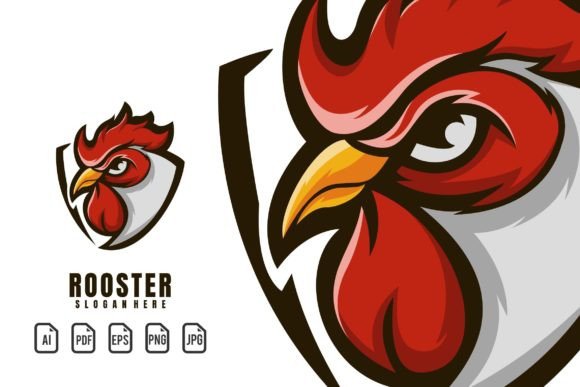
There’s a moment in every branding project where a generic icon just won’t cut it. You need something with attitude—a face, a posture, a spark that talks back to the viewer. That’s where a Roaster Mascot Logo steps in. It’s not simply a chicken or a rooster drawn on a shield. It’s a full visual personality built around a feisty, confident bird that resonates with gaming clans, grill houses, streetwear startups, sports clubs, and content creators who want their identity to feel instantly alive.
This particular logo template delivers that personality in a 100% vector package. Every curve, crest, and fiery eye is editable, scalable, and ready to become the face of a brand—or the hero of a poster, jersey, or app icon. When people download this template, they’re not just grabbing a flat graphic. They’re getting a flexible system that lets them change the name, tweak the colors, and resize the artwork from a tiny social avatar to a massive stadium banner without losing any crispness.
What Makes This Roaster Mascot Template So Adaptable?
Many logo packages look good in the preview but struggle when you need to change something small—like the text or the tone of a highlight. This kit side-steps that frustration because everything arrives as fully editable vector work. You get formats like AI, PDF, EPS, and clean raster exports in PNG and JPG. That means whether you use Adobe Illustrator, CorelDRAW, Affinity Designer, or even free tools, there’s a file that fits your workflow.
The included font information is a quiet superpower. The template uses a specific typeface that complements the roaster’s aggressive stance, but you aren’t stuck with it. A quick download of the suggested free font lets you edit the placeholder name directly—no tracing, no guessing. You can type your team name, channel handle, or product line right into the text layer and watch it snap into place. This makes the template genuinely reusable across totally different projects, not just a one-and-done asset.
Where a Game Character or Roaster Theme Poster Comes to Life
Walk into any gaming café or scroll through an esports tournament feed, and you’ll see mascot logos everywhere. A fierce rooster with a team jersey or a headset becomes more than decoration—it becomes a rallying point. Using this template, a Game Character logo can be adapted for a player’s personal brand, a guild emblem, or even an in-stream overlay. Because the artwork is fully vector, a designer can isolate the head for a YouTube avatar, enlarge the full body for a Twitch banner, or extract just the claws and ball (if included) for a custom subscriber badge.
Posters amplify that energy. A Roaster Theme Poster designed from this template can promote a seasonal tournament with the roaster clutching a controller or a flaming soccer ball. The editable colors mean you can align the fiery reds and golds with a team’s colorway in minutes. And because the source files are crisp, you can blow the graphic up to A1 or even billboard size without jagged edges—something a low-res PNG could never survive.
Why Sports Teams and Apparel Lines Adopt This Mascot Style
Sports logos thrive on aggression and movement, and a rooster mascot naturally carries both. A local soccer club might use the template to create a Sport Logo that features the rooster mid-stride, talons extended. The editable text field lets them swap in the team name—say “Ridgefield Roasters”—and the easy color editing means they can match the uniform stripes exactly. Within an afternoon, they have a crest that looks custom-illustrated, ready for jerseys, water bottles, and sideline flags.
For apparel startups, the roaster becomes a lifestyle symbol. A small streetwear label can drop a limited hoodie with the mascot printed large on the back, paired with the brand name in the same font. Because the template includes PNG files with transparency, it slips directly into mockups without background hassle. The JPG exports are already flattened for quick social media teasers. When the next collection launches, the same vector base can be recolored and re-named—turning one template into a series that looks cohesive but fresh.
Small Business Branding with Personality
A coffee roastery, a hot sauce company, a backyard BBQ catering service—these aren’t businesses that connect through quiet logotypes. They need a visual hook that tells you the product has fire. A Roaster Mascot Logo gives them exactly that. Imagine a local roastery putting this mascot on their bags: the bird’s comb tweaked to match the deep burgundy of a signature blend, the beak curved into a confident smirk. The template’s resizable nature means the same file works for a tiny label seal and a large café chalkboard decal.
Even a food truck can benefit. The vector EPS can be sent to a sign shop for vehicle wrap quoting, while the PNG version fits the truck’s Instagram grid perfectly. And when the owner wants to slap the logo on a team shirt for a chili cook-off, they don’t need to hire a new designer—they just change the text, adjust a hue, and export. The template’s “everything is editable” promise becomes a real budget-saver for small ventures that can’t afford multiple custom illustrations.
Streamers and Content Creators: Building a Visual Identity That Sticks
For a streamer, a recognizable mascot builds community faster than any thank-you alert. When someone sees that roaster staring down from a channel banner or glowing on a “Starting Soon” screen, they remember the channel. This template slides straight into that ecosystem. A creator on Twitch or Kick can drop the mascot into OBS overlays, use it as a subscriber-only emote (after simplifying the vector details a bit), or print it on merch sold through a creator store.
The editable name feature is especially valuable here. A streamer can use the same symbol but update the text for special events—“Subathon 2025” or “1000 Followers”—while keeping the core emblem intact. The vector quality means when the channel grows and needs a professional intro animation, the designer can work directly with the AI or EPS file, no redrawing needed.
From Digital to Print: Scalability Across Mediums
A logo that looks crisp on a website header but falls apart on a trade show banner isn’t really “professional.” The 100% scalable vector files in this template solve that problem before it starts. Everything is resizable without pixelation. A marketer can pull the same AI file into a social media graphic template at 500x500 pixels and later into a signmaker’s 10-foot booth backdrop. The consistency across all touchpoints—website, business card, package, canopy—builds the kind of visual trust that customers pick up on, even if they can’t articulate why.
The raster files serve a specific purpose too. The PNG with transparency is perfect for dropping into presentations or website elements where a vector isn’t practical. The high-quality JPG works for quick email signatures or event registration platforms. And because the source is vector, you’re never upscaling a small raster; you’re exporting a fresh, perfectly sized raster from the original art every time.
Editing Colors and Text to Match Your Niche
One of the most anxiety-inducing moments for a non-designer is opening a template and realizing the text isn’t editable, or the color palette locks you into something that clashes with your existing brand. This Roaster Mascot template defuses both issues directly. The text layers are live and the font that was used is clearly documented. You download the suggested free font, install it, and suddenly you can type any team name, company tagline, or personal mantra right into the design. If you prefer a different typeface altogether, that’s fine too—just select the text and choose whatever you have licensed.
Color editing is just as straightforward. Need the roaster’s feathers to shift from orange to electric green for a neon gaming brand? Open the global color swatches and change a few values. Want the entire logo to sit on a dark background without a white ghost outline? Adjust the stroke or background shape. The editable nature means you’re not stuck with the demo version’s aesthetic. You can take a template that originally looked like a retro sports emblem and recolor it into something cyberpunk, western, or soft and friendly—depending on the story you need to tell.
Practical Considerations Before You Download the Template
Before hitting the download button, a few reality checks make everything smoother. First, know which software you’ll use. The AI and EPS files work best in vector editors like Adobe Illustrator, Affinity Designer, or Inkscape. If you only have basic photo editing apps, you might struggle with full editability, though you can still use the pre-sized rasters. Second, understand font licensing. The template’s help file points you to a free font, which typically covers commercial use—but double-check the author’s license on the font site. If you plan to trademark the finalized logo, using an open-source or properly licensed typeface keeps things clean.
Third, think about the final look of the name. If your team name is long, it might need kerning adjustments or a smaller point size to fit the allocated space. Fortunately, because the text is editable, you can tweak size and spacing until it sits comfortably inside the logo’s frame. Fourth, consider the background environments where the logo will appear. If you often need a one-color version for embroidery or single-color screen printing, you may need to simplify the vector a little. Since the file is editable, you can isolate silhouette layers or adjust the stroke weight to create a crisp, single-color variant without starting from scratch.
How Different Users Extract Unique Value from the Same Template
An athletic apparel designer, a high school esports coach, a food blogger, and a craft brewery owner can all open the same folder of AI, PDF, EPS, PNG, and JPG files—and walk away with completely distinct results. The designer might push the mascot into a full jersey pattern, using the roaster’s profile as a repeating element. The coach could present a cleaned-up vector to a local print shop for team hoodies. The food blogger might use the PNG to brand a recipe PDF and YouTube thumbnail. The brewery could recolor the roaster to match a new seasonal ale label, only touching the head portion for a tighter composition.
This isn’t theory. It’s the result of a well-structured template that prioritizes editability over lockdown. Because the source art isn’t flattened or masked into oblivion, you can grab individual elements—the flames, the eye, the comb, the text frame—and reuse them in isolation. That flexibility turns a single purchase into a long-term brand toolkit, especially for entrepreneurs who release new products, events, or content regularly.
Getting the Most Out of the Roaster Mascot Logo Template
Start by backing up the original files. Then open the AI or EPS and immediately do a “Save As” with your project name. Poke around the layers panel to understand how the artist grouped the artwork. If you need to change the name, install the free font, locate the text layer, and type your replacement. Watch how the new word fills the space; adjust font size or tracking if needed. Next, explore the color swatches. Most vector mascots use a few global colors that control many elements at once. Changing one swatch can recolor the whole roaster in seconds. Test those color combinations on both light and dark backgrounds using the PNG export function.
When you’re happy, export a set of deliverables: a full-color EPS for print partners, a transparent PNG for web use, and a high-quality JPG on a solid background for quick social posts. Keep your editing session open so you can create event-specific versions later. Over time, you’ll find that the template morphs into something deeply personal—the same rooster that started as a temporary placeholder might become the cherished symbol of a community, a team, or a growing business. That’s the quiet value of a truly editable, vector-based mascot: it can carry a name and a color scheme you define, long after the download link expires.
The roaster mascot logo template isn’t just artwork. It’s a starting point for hundreds of visual stories. Whether it ends up on a gaming controller skin, a coffee bag, a rugby jersey, or a podcast cover, the outcome depends entirely on how you shape it. All the tools are there—vector files, editable text, color controls, and the right font information. The rest is simply knowing your audience and having the confidence to make the mascot your own.