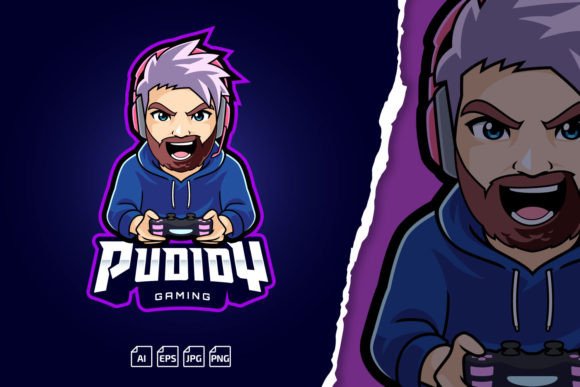
The Hipster Gamer Beard Mascot Logo as the Foundation of a Flexible Brand Identity
A logo is not just a graphic. For streamers, esports teams, and content creators, it serves as the visual anchor that connects every channel, overlay, merchandise design, and social media post. The Hipster Gamer Beard Mascot Logo template is built around that idea—a ready-to-customize character that brings personality while still fitting into a structured production pipeline. Instead of starting from a blank canvas, you get a layered, scalable mascot that you can adapt to match any team name, color scheme, or platform requirement.
This kind of asset matters most when you are trying to maintain consistency across Twitch emotes, Kick banners, YouTube thumbnails, and printed materials. A hand-drawn beard mascot with a hipster edge signals a specific subculture—modern, slightly ironic, detail-oriented—which appeals to audiences who value craft and individuality. But the real value lies in how the template integrates into your existing workflow. The included AI, EPS, PNG, and JPG files are not just “extras”; they are the difference between a one-off graphic and a long-term brand component you can update and reuse without starting over.
Understanding What the Template Actually Contains
Before dropping the mascot into a project, it helps to know exactly what you’re working with. The file package is designed to cover a range of production scenarios, from quick social posts to high-resolution print runs. The Adobe Illustrator CC (AI) file is the primary working document. It contains editable text and fully layered vector artwork, which means you can change the name, adjust colors, and resize the beard, glasses, or any element independently without losing quality.
The EPS (version 10) file ensures compatibility with older software or vector editing apps that might not open a modern AI format. For immediate use, the transparent PNG gives you a clean, web-ready version that sits over any background without a white box. The JPG preview is a quick reference for rough placement in mockups or documents. A ReadMe.txt file points you to the font download link and installation instructions, which is critical because the specific hipster-style typeface is what ties the logotype to the mascot’s character.
Where the Hipster Gamer Beard Mascot Logo Fits in a Branding Process
Branding for gaming content often happens in stages. You start with a concept, move to a sketch or character, refine it, and then export dozens of variations. The Hipster Gamer Beard Mascot Logo shortens the ideation phase. You are not designing a mascot from scratch; you are re-skinning and adapting a proven structure. This matters when you need to launch a channel or rebrand a team quickly.
Typically, the mascot becomes the centerpiece once you have your name locked in. You open the AI file, double-click the placeholder text, type your team or channel name, and the logotype updates while preserving the original warping, spacing, and style of the hipster font. From there, you can adjust the beard shape, recolor the cap, or tweak the glasses to match your brand palette. Because the file is layered, you can isolate the mascot from the text and use each part separately. The beard icon alone might become a favicon, while the full mascot stays on the banner.
Using Scalable Vectors Across Multiple Platforms
One of the most common friction points in a creator’s workflow is resizing graphics. A logo that looks crisp on a Twitch banner at 1200×480 pixels may blur when stretched for a large-format print or shrunk to a 28×28 pixel emote. The template solves this by being 100% vector. The AI and EPS files allow you to scale the mascot to any size without pixelation. When you need a Kick emote, you export a small PNG at the required dimensions. For a banner, you export a wider version. For a T-shirt design, you can scale up to 15 inches without loss of detail.
This unlimited scaling also means you can repurpose the mascot for unexpected formats later—stickers, car wraps, animated overlays, or even 3D prints based on the vector outlines. You are not locked into a 72-dpi raster image that falls apart under pressure.
Integrating the Logo into Daily Production Workflows
Content creators rarely work on branding in isolation. A typical week might involve designing a new stream overlay, updating the offline screen, preparing a YouTube thumbnail template, and refreshing emotes. The Hipster Gamer Beard Mascot Logo becomes a reusable module in that routine. Once you customize the master AI file, you can export asset packages without re-editing the core design.
For example, you might create a “emotes” artboard in Illustrator that contains isolated eyes, beard, and cap versions. Then export them all at once using the “Export As” or “Save for Web” feature. The transparency in the PNG files means you don’t need to manually remove backgrounds in Photoshop every time you prepare an emote. That alone saves 10–15 minutes per asset. Over months, that time compounds.
Working with the Included Font and Text Customization
Typography can make or break a logo. The template relies on a specific free-for-commercial-use font that matches the hipster aesthetic. The ReadMe file contains the font name and a link to download it. The installation process is straightforward: download the font, install it on your system (or activate it via a font manager), and then reopen the AI or EPS file. The text will render correctly, preserving the artistic shape of the logotype.
Without the font, Adobe Illustrator may substitute a default, and you’ll lose the intended look. The ReadMe’s step-by-step instructions prevent that. Once the font is active, changing the name is a matter of selecting the text layer and typing. Because the type is editable and not outlined, you retain full typographic control—you can adjust letter spacing, change the color stroke, or even swap in a different font if you want a completely different vibe. Just remember that dramatic changes might require manual kerning adjustments so the words still feel balanced.
Practical Implementation for eSports Teams and Streamers
For an esports team, visual consistency across jerseys, social headers, and stream overlays signals professionalism to sponsors. The Hipster Gamer Beard Mascot Logo can function as the secondary mark alongside a more abstract primary logo, or it can stand alone if the team identity is built around that character. Because the mascot has distinct recognizable features (beard, glasses, cap), it remains identifiable even when simplified for smaller applications.
When preparing files for a team, you might create variants: a full-color version, a monochrome version, and a badge-style version where the mascot is contained inside a shield or circle. All of this is possible within the same Illustrator document using layers. You can toggle layer visibility to hide the text, show only the beard and glasses, or change the cap color for different team roles (captain, coach, etc.). This layer-based approach keeps everything organized in a single file, reducing the risk of version chaos.
Handling Emotes and Small-Scale Graphics
Twitch and Kick emotes require extreme simplification. At 28×28 or 112×112 pixels, fine lines disappear. The template’s mascot has enough silhouette strength to survive that reduction if you prepare it properly. After scaling the vector down, you might thicken the beard strokes slightly or remove tiny details like the nose highlight. Because the source file is editable, you can create an “emote-optimized” variant with heavier line weights, bolder colors, and a simpler composition. That variant stays consistent with the brand but performs better in the chat window.
The transparent PNG also matters here. When you upload an emote, the background must be blank. With the included PNGs, you already have a file ready for submission. You just resize it to the platform’s specifications and upload. No extra masking steps.
Long-Term Maintenance and Brand Updates
Brands evolve. A year from now, you might want to tweak the color palette or refine the beard shape to match a new streaming backdrop. The layered vector files make that possible without redrawing anything. You open the original AI file, make the adjustment, and re-export all your platform-specific graphics. The alternative—rebuilding the logo from stack raster images—would require hours of cleanup and still produce lower-quality results.
This forward compatibility also applies to team expansions. If your squad grows and you want to create individual player mascots with different beards or hats, you can duplicate the base layer and modify only the distinguishing features. The uniform font and mascot structure keep the family feel, but each player gets a unique touch. That kind of scalable branding is what separates organized teams from chaotic ones.
Quality Control and Consistency Checks
When a logo moves from a PC monitor to a printed banner, colors shift if you’re not careful. The template’s AI and EPS files are set up in CMYK color mode for print and can be switched to RGB for digital use. This dual-mode awareness prevents off-blue prints or washed-out reds on merchandise. Before sending a file to a print shop, confirm that the color profile matches their requirements. Because the vector is resolution-independent, the printer’s RIP software will interpret clean paths, avoiding the jagged edges that plague low-res JPEGs.
For digital consistency, create a small style guide for yourself: the exact hex codes of the mascot’s main colors, the font name and weight, and a note on minimum clear space around the logo. With the template, you can generate examples of correct and incorrect usage directly from Illustrator—just place the logo on different backgrounds and export reference sheets. This one-time upfront work prevents misapplication down the road.
Integrating with Other Tools and Platforms
The Hipster Gamer Beard Mascot Logo Template isn’t an isolated asset. It slots into a broader ecosystem of creation tools. After exporting from Illustrator, you can animate the mascot in After Effects by separating layers and importing them as a composition. The beard could wiggle, the glasses could flash, the cap could tip. The vector origin ensures clean edges during motion. For streamers using OBS or Streamlabs, the PNGs become image sources for overlaid. For website headers, you can export an SVG from the AI file for crisp rendering at any viewport size.
If you’re working with a team of designers who don’t all have Adobe Illustrator, the EPS file serves as a universal exchange format. An Affinity Designer or CorelDRAW user can open it and continue editing. The included ReadMe file also offers a contact method if you encounter issues with modification. That support loop—from tutorial video to direct help—acts as a safety net for non-designers who want professional results.
Planning Your Implementation Timeline
Integrating the mascot logo isn’t a one-and-done task. Map out which platforms need the logo first. If your Twitch channel is the priority, you might start with the avatar, offline banner, and a few emotes. The template lets you batch-export these assets in one session. Then schedule a follow-up pass for YouTube headers and social media profile images. By grouping tasks by platform rather than by asset type, you maintain momentum and avoid re-opening the master file repeatedly for single exports.
Consider saving a “production master” that has all the final export artboards properly named and sized. Next time you need a new emote or a redesigned banner, you open that file, make the change once, and re-export from the same artboards. This workflow turns the template into a living brand system, not a static download.
The real power of an editable mascot template is that it removes the friction between having a visual idea and executing it. You no longer need to commission a custom illustration every time you launch a new side project or rebrand a team. Instead, you build a library of consistent, high-quality variations that reinforce your identity with every post, stream, and match. The Hipster Gamer Beard Mascot Logo becomes less of a single file and more of a foundational tool in your content creation stack.