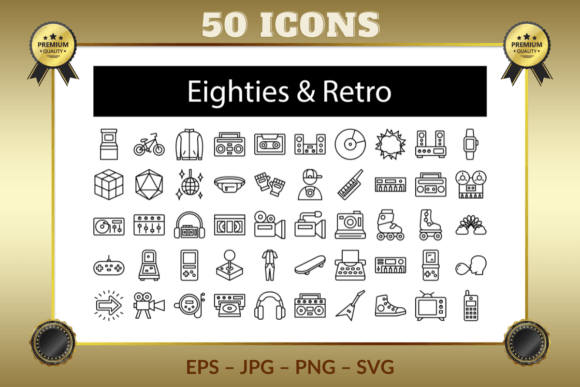
Eighties Retro Outline Icons: The Vector Collection That Packs a Nostalgic Punch
Designers and creative professionals often search for assets that strike the perfect balance between style, flexibility, and nostalgia. The Eighties Retro Outline Icons set delivers exactly that—a meticulously crafted library of over 50 symbols that capture the essence of the 1980s, from arcade cabinets and boomboxes to rollerblades and retro game consoles. But what really makes this collection stand out is its technical foundation: every icon is a 100% vector file, fully editable, resizable, and layered, ensuring you never lose quality no matter how you transform them.
Why Outline Style Works So Well for Retro Projects
The minimalist, stroke-based look of these Eighties Retro Outline Icons feels both modern and timeless. Unlike flat or highly detailed illustrations, outline icons don’t overwhelm a composition. They breathe life into packaging, websites, apparel, or social media graphics without demanding attention. Because they rely on clean lines rather than filled color blocks, you can easily change the stroke width, color, or even add your own gradients later—complete creative freedom that a raster image simply can’t offer.
Think about a classic cassette tape icon. In an outline version, the recognizable silhouette stays intact, yet you can adjust the line thickness to match a chunky 80s logo or a delicate, modern interface. The same applies to the disco ball, keytar, or Polaroid camera—their shapes remain iconic, but the outline treatment keeps them adaptable. That flexibility is crucial when you’re blending retro elements with contemporary design trends.
The Vector Advantage: Scale Without Compromise
Every asset in this bundle—from the Arcade machine to the BMX Bike—exists as a true vector graphic. That means you can shrink a Digital Watch down to a tiny app icon or blow up a Magic Cube to billboard size without encountering a single pixelated edge. For anyone who has ever tried to enlarge a JPG only to see soft, blurry edges, this is a game changer.
Vector scalability is especially important in responsive web design and multi-format branding. A Retro TV icon might need to appear at 24×24 pixels in a mobile menu and then at 300×300 pixels on a posters. With these Eighties Retro Outline Icons, both uses pull from the same source file, eliminating the need to export multiple sizes manually. Plus, since vectors are resolution independent, you get crisp results on retina screens and high-DPI prints without extra work.
Fully Layered Files for Effortless Customization
Beyond scalability, each icon arrives as a fully layered composition. Open an EPS or AI file, and you’ll discover grouped paths that let you isolate or tweak individual elements. Want to change the color of the Bomber Jacket’s collar? Or add a glow effect to the Neon Sign? Simply ungroup, select, and edit. The layered structure also means you can combine parts from different icons—perhaps merging the Retro Game Console with the Retro Joystick to build a custom gaming emblem.
This editability extends beyond color swaps. Because the icons use outlined strokes, you can apply outline offset effects, convert them to filled shapes for a bold look, or even animate individual paths in tools like Adobe After Effects. The creative possibilities multiply when you realize you’re not locked into one style. The Fanny Pack icon can suddenly become a neon party invitation element, while the Roller Skate transforms into a durable cutout for laser engraving—all thanks to the original vector and layered setup.
A Nostalgic Journey Through Icon Diversity
What truly sets this collection apart is the breadth of subjects. You’re not just getting a handful of generic 80s symbols; you’re handed a full toolkit that spans music, gaming, fashion, technology, and pop culture. Here’s a glimpse into the thematic richness:
- Music & Audio: Boom Box, Cassette, Sound System, Keytar, Keyboard, Digital Piano, Tape Deck, Tape Recorder, Turntable, Mixer, Walkman, Discman, CD Player, Retro Headphones, Radio, Electric Guitar
- Gaming & Arcade: Arcade, Pinball Machine, Retro Game Console, Retro Joystick, Brick Game, Magic Cube, D20 Dice
- Photography & Video: Polaroid Camera, VCR, Video Recorder, Video Camera, Movie Projector
- Fashion & Accessories: Bomber Jacket, Fanny Pack, Fingerless Gloves, Tracksuit, Shoes, Digital Watch, Rollerblade, Roller Skates
- Miscellaneous Pop Culture: Disco Ball, Rainbow Spring, Bubble Gum, Neon Sign, Skate Board, Typewriter, Synth Keyboards, Retro TV, Mobile Phone
Mixing and matching these categories allows you to tell a cohesive story. A retro diner menu might feature the Bubble Gum and Skate Board. An 80s music festival poster could combine the Boom Box, Synth Keyboards, and Disco Ball. The outline style ties everything together visually, so even disparate objects feel like they belong in the same design system.
File Formats That Fit Every Workflow
The developers of these Eighties Retro Outline Icons understand that no two designers work identically. That’s why the pack includes four versatile formats: EPS, JPG, PNG, and SVG. Each serves a distinct purpose in your daily pipeline.
EPS (Encapsulated PostScript): The gold standard for print and vector editing. Open it in Adobe Illustrator, CorelDRAW, or Affinity Designer, and you’ll find the fully layered editable artwork. Use this when you need maximum control—for instance, recoloring the Tape Recorder to match your brand palette before sending it to a print shop.
SVG (Scalable Vector Graphics): A web developer’s best friend. SVGs are lightweight, XML-based, and can be styled with CSS or animated with JavaScript. Insert the Retro Game Console directly into your HTML, and watch it scale fluidly on any screen size without making extra HTTP requests.
PNG (Portable Network Graphics): Ideal for immediate use in presentations, mockups, or social media posts when you don’t need to further edit the vector. The transparent background of the PNG format means the Disco Ball sits cleanly over any image or solid color layer.
JPG (Joint Photographic Experts Group): While less critical for design work, the included high-resolution JPGs are perfect for quick previews or when a platform requires a flattened, small-file-size image.
Having all four formats removes guesswork. You don’t have to convert files on the fly or lose quality in the process. Simply grab the right version for the task at hand.
Seamless Integration with Industry-Standard Software
Compatibility is often a hidden headache with digital asset packs. Fortunately, these icons are purpose-built for Adobe Illustrator, Adobe Photoshop, and CorelDRAW. Import the EPS into Illustrator, and every layer remains intact. Drag an SVG into Photoshop as a smart object, and you retain the vector sharpness while still applying layer styles like drop shadows or strokes. CorelDRAW users can open the same EPS and enjoy full editability without cross-software conversion troubles.
Even if you work in less common tools—like Figma, Inkscape, or Sketch—the SVG format ensures you can still place and scale the icons without issue. Many UI/UX designers will appreciate dropping an Arcade or Boom Box outline into a wireframe, recoloring it instantly using the fill property, and exporting for prototyping. The icons adapt to your toolset, not the other way around.
Practical Uses That Go Beyond the Obvious
While it’s easy to imagine these Eighties Retro Outline Icons on a retro-themed T-shirt or an 80s night flyer, their utility stretches further. Web designers can build an entire navigation system around the Walkman, Cassette, and Discman icons for a music streaming blog. Event planners can use the Polaroid Camera and Movie Projector to create photo booth signage. App developers might integrate the Digital Watch or Mobile Phone icons into a vintage-themed productivity tracker.
The outline treatment also makes them excellent for laser engraving and vinyl cutting. The monoline strokes translate beautifully to physical fabrication. Imagine a custom engraved water bottle featuring the Skate Board and BMX Bike—the vector paths are clean enough that your cutter or engraver won’t hiccup. Similarly, stencil artists and crafters can scale the Rainbow Spring or Fingerless Gloves to any size for spray-painting projects without losing edge fidelity.
What to Look for When Choosing Retro Icon Sets
Not all retro icon bundles are created equal. Before purchasing or downloading, consider these often-overlooked factors that make the Eighties Retro Outline Icons a trustworthy choice:
- True Vector Architecture: Some packs claim to be vectors but consist of embedded rasters inside an EPS wrapper. Here, every icon is built from legitimate paths and anchor points, so you can zoom in infinitely without surprise pixelation.
- Layer Organization: Poorly grouped files waste hours. This collection’s layered hierarchy is logical and clean, with major components of an icon like the Retro TV (antenna, screen, buttons) each existing on separate sub-layers.
- Stroke Consistency: Outline icons rely on uniform or intentionally varied stroke weights. All icons here maintain a coherent visual rhythm, so placing the Bomber Jacket next to the Turntable doesn’t create awkward style clashes.
- Licensing Clarity: While not explicitly detailed in the description, professional icon sets typically come with royalty-free usage rights. Always confirm you can use them in commercial products without ongoing fees.
- Format Versatility: Access to EPS, JPG, PNG, and SVG under one roof means you spend less time converting files and more time designing.
Bringing Back the 80s with Modern Efficiency
The 1980s were loud, colorful, and unabashedly bold. Today’s design projects often borrow that energy but need to apply it within minimalist or hybrid visual systems. The Eighties Retro Outline Icons bridge this gap. They bring back the shapes of the Hip-Hop culture, the Brick Game handhelds, and the VCR era without overwhelming a layout with retro clutter. Because they are outlines, they can sit comfortably alongside contemporary sans-serif typography and white space, lending a subtle vintage wink rather than a full-on costume party.
For example, a modern SaaS dashboard could use the Typewriter icon to represent a “legacy data” module, or the Synth Keyboards to symbolize a creative analytics section. These outline icons speak to an era of tangible buttons and knobs, which can make digital interfaces feel more human. The scalability ensures that whether you’re printing a giant backdrop for an 80s-themed wedding or embedding a tiny Bubble Gum icon in an email signature, the quality never wavers.
Quick Tips for Maximizing the Icon Set
To get the most out of your Eighties Retro Outline Icons, try these workflow adjustments:
- Customize Stroke Widths Globally: In Illustrator, select all icon paths and adjust the stroke weight uniformly to quickly adapt the entire set for a delicate UI or a heavy-impact poster.
- Combine with Color Trends: Use a neon pink-to-cyan gradient on the Neon Sign icon, or apply a retro duotone to the Retro Headphones to align with current design fads.
- Build Composite Scenes: Layer multiple icons—say, the Fanny Pack, Rollerblade, and Boom Box—to create a vibrant pattern for wrapping paper or website backgrounds. Since they’re vectors, you can repeat and tile them without performance hits.
- Animate the SVGs: Add a simple rotation to the Disco Ball or a spinning record to the Turntable using CSS or JavaScript. The SVG format makes this surprisingly easy with keyframe animations.
- Use as Wireframe Icons: The blank center of outline icons makes them perfect for low-fidelity prototypes. Swap in the Retro Game Console for a gaming category placeholder and watch it not distract from the layout grid.
The Enduring Appeal of Hand-Crafted Vector Art
In an age dominated by AI-generated imagery, there’s a refreshing authenticity to a thoughtfully designed icon set. The Eighties Retro Outline Icons were built with care—each Polaroid Camera and Discman has been cleaned up, balanced, and tested for visual impact. They don’t rely on trendy filters; they’re simply solid, well-structured vector shapes that do what they promise: remain editable, scalable, and resizable without losing quality.
Whether you’re a seasoned graphic designer hunting for reliable assets or a small business owner wanting to spice up your marketing materials, these icons remove the technical barriers. You can focus on the creative message while the files handle the heavy lifting. Pop open the EPS in CorelDRAW, import the SVG into your web project, or drag a PNG into a Canva composition—the 80s never looked so sharp.